Cryptopals Set 1: The Basics
Hello again!
I've been preparing to start w*rking. Since my work will (hypothetically) be heavily centered on cybersecurity and high performance computing, I figured that I could brush up on some of those concepts. That's when I stumbled across The Cryptopals Crypto Challenges.
It's a series of programming challenges that teach you about cryptography in a non-textbook setting. I decided to take a crack at it.
Written below is my writeup for the first set. It was honestly a pain trying to figure out what to include and what not to include. Should I frame this blog to the inexperienced or the experienced reader? I decided on something in between. The concepts will be explained on a surface level, but the coding will not be explained too well. I will be using C as my programming language for the sake of re-learning low level topics (i.e. pointers, stack/heap).
Under each problem, a "topics covered" list will be provided. It will be much easier to read the writeup if you have some prior knowledge of these topics.
(This blog is currently being updated with new challenges and better explanations. At the moment, the whole set is complete - I just have to write.)
Challenge 1: Hex to Base64
A very well-known problem! Here is the example that is provided:
The hex string: <code className="break-all whitespace-pre-wrap" style={{ wordBreak: 'break-all', whiteSpace: 'pre-wrap' }}>49276d206b696c6c696e6720796f757220627261696e206c696b65206120706f69736f6e6f7573206d757368726f6f6d
Should produce: <code className="break-all whitespace-pre-wrap" style={{ wordBreak: 'break-all', whiteSpace: 'pre-wrap' }}>SSdtIGtpbGxpbmcgeW91ciBicmFpbiBsaWtlIGEgcG9pc29ub3VzIG11c2hyb29t in base64.
Topics Covered: Number Systems (base-10, base-16, base-2, base-64) Bitwise operations (bit shifting, and, or) Bytes and ASCII encoding
Okay, slow down. Let's start with number systems.
For starters, think of our number system - base-10 (also known as the decimal system). The system is known as "base-10" because we have 10 digits (0-9). Counting in base-10 - as you probably know already - goes as follows:
Hexadecimal (Hex) is a computing notation that uses a base-16 number system. The digits in hexadecimal consist of 0-9 as well as A-F, making a total of 16 possible digits. Counting is similar.
Another example (which will become relevant very soon) is binary. You may have heard about this number notation a lot when talking about computers. Binary is in base-2, so there are only 2 digits: 0 and 1.
Now here's a cool observation: with 1 binary digit, we can represent 2 numbers (0 and 1). With 2 binary digits, we can represent 4 numbers (00, 01, 10, 11). With 3 digits, we can represent 8 numbers (000, 001, 010, 011, 100, 101, 110, 111). The generalization becomes clear — with digits, we can represent numbers.
Hexadecimal digits (there are 16 of them) can be represented using 4 binary digits. We can have a direct conversion!
| Hex | Binary | Decimal | │ | Hex | Binary | Decimal |
|---|---|---|---|---|---|---|
0 | 0000 | 0 | │ | 8 | 1000 | 8 |
1 | 0001 | 1 | │ | 9 | 1001 | 9 |
2 | 0010 | 2 | │ | A | 1010 | 10 |
3 | 0011 | 3 | │ | B | 1011 | 11 |
4 | 0100 | 4 | │ | C | 1100 | 12 |
5 | 0101 | 5 | │ | D | 1101 | 13 |
6 | 0110 | 6 | │ | E | 1110 | 14 |
7 | 0111 | 7 | │ | F | 1111 | 15 |
(Apologies if the counting systems did not make much sense. Please feel free to consult other resources to get a better understanding.)
Base64 — as the name suggests — uses a base-64 number system. This means that there are 64 "digits". These "digits" are not just conventional numbers — they actually cover A-Z (26), a-z (26), 0-9 (10) and +, - (2). .
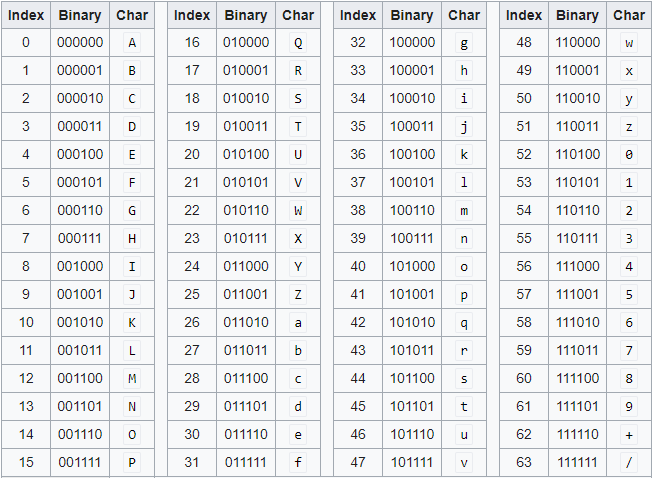
The Base64 Index Table (source)
In order to represent 64 digits in binary, we need 6 digits (). Thus, we have some sort of pipeline: .
We convert the incoming hex characters into binary digits. From there, we turn the binary digits into base64 characters (we divide by 6 because we need 6 digits to represent a base64 character).
Wait, hold on. Bits or Bytes?
Up until now, I haven't talked about bytes. A byte is a group of 8 bits. Most operations are conventionally done in bytes. We establish groups to give meaning - 8 bits is enough to represent an [ASCII character](https://en.wikipedia.org/wiki/ASCII). The number 8 is an arbitrary number.OK, now we code.
To start, I create a function hex_to_num. This will take in a hex character (0-9 + A-F) and turn it into its integer counterpart.
int hex_to_num(char hex) {
        if(hex >= '0' && hex <= '9') return hex - '0';
        // ^^ using character subtraction. '8' - '0' = 8
        // (ASCII values of the characters.)
        else if(hex >= 'A' && hex <= 'F') return hex - 'A' + 10;
        // ^^ again, using character operations. 'A' - 'A' + 10 = 10.
        else if(hex >= 'a' && hex <='f') return hex - 'a' + 10;
        // ^^ 'a' - 'a' + 10 = 10. Same logic.
        else return -1; //should not happen.
}
As a note, a char in C is one byte ( digits) in size. It represents an ASCII character (as mentioned earlier).
Meanwhile, an int is four bytes () in size. It represents integers. (I will not talk about signed vs. unsigned for now).
Now that we have something that can turn a hex character into a number, let's use that to turn a hex string into bytes.
I create a function hex_to_bytes.
int hex_to_bytes(const char* hex, unsigned char* bytes, size_t hex_len) {
    if (hex_len % 2 != 0) return -1;
    for (size_t i = 0; i < hex_len; i += 2) {
        int high = hex_to_num(hex[i]);
        int low = hex_to_num(hex[i + 1]);
        if (high == -1 || low == -1) return -1;
        bytes[i / 2] = (high << 4) | low;
    }
    return hex_len / 2;
}
Remember that a hex character is 4 bits (or half a byte). That means that 2 hex characters make up 1 byte.
Thus, the new size of the byte output should be hex_len / 2.
The function takes in the full hex string, the output buffer (unsigned char* bytes) and the size of the hex string (hex_len).
I take hex characters 2 at a time (it errors if there's an odd number), call hex_to_num on each, and combine them into a byte using bit shifting.
Bit Shifting? What is that?
In our decimal system, we can pad our numbers with 0s on the right by multiplying by our base (which is base 10). For example, . .We do the same thing in binary - we multiply by 2. If we multiply 2 (10 in binary) by 2, we get 4 (100 in binary). Bit shifting is the idea of multiplying - or dividing by - our base (which is 2).
This becomes useful when we want to move bits around. Let's say I want to combine two hex digits A (1010) and B (1011) into a byte.
Starting with A, I bit shift 4 digits. This is the same as multiplying by . 1010 becomes 1010 0000 (the space is there for readability purposes - we added 4 zeros).
We then do a bitwise OR with B (0000 1011 - the zeros on the left are padded the same way 7 can be written as 07), giving us 1010 1011 (or AB in hex).
Oh boy - what is bitwise OR?
Bitwise OR is an operation that takes in two bits and outputs 1 bit. If one of the two inputs is 1, the output is 1. Otherwise, the output is 0.| input1 | input2 | output |
|---|---|---|
| 0 | 0 | 0 |
| 0 | 1 | 1 |
| 1 | 0 | 1 |
| 1 | 1 | 1 |
Thus, by doing bitwise OR on 1010 0000 and 0000 1011, we get:
1 0 1 0 0 0 0 0 --> (A << 4)
OR 0 0 0 0 1 0 1 1 --> (B)
-------------------
   1 0 1 0 1 0 1 1 --> (AB)
Again, apologies if this doesn't make much sense. I'm going to keep updating this blog to try and explain it better.
Back to our code. We get two hex strings, turn them into numbers and do some bitwise operations to get our bytes.
Now we have to convert these bytes to base64. To do this, I create the function bytes_to_base64.
int bytes_to_base64(const unsigned char* bytes, size_t bytes_len, char* base64_out, size_t out_max_len) {
    size_t required_len = ((bytes_len + 2) / 3) * 4;
    if (out_max_len < required_len + 1) return -1;

    size_t i = 0, j = 0;
    for (; i + 3 <= bytes_len; i += 3) {
        unsigned int val = (bytes[i] << 16) | (bytes[i+1] << 8) | bytes[i+2];
        base64_out[j++] = base64_table[(val >> 18) & 0x3F];
        base64_out[j++] = base64_table[(val >> 12) & 0x3F];
        base64_out[j++] = base64_table[(val >> 6) & 0x3F];
        base64_out[j++] = base64_table[val & 0x3F];
    }

    if (i < bytes_len) {
        unsigned int val = bytes[i] << 16;
        if (i + 1 < bytes_len) {
            val |= bytes[i+1] << 8;
        }

        base64_out[j++] = base64_table[(val >> 18) & 0x3F];
        base64_out[j++] = base64_table[(val >> 12) & 0x3F];

        if (i + 1 < bytes_len) {
            base64_out[j++] = base64_table[(val >> 6) & 0x3F];
        } else {
            base64_out[j++] = '=';
        }
        base64_out[j++] = '=';
    }
    base64_out[j] = '\\0';
    return 0;
}
This function takes 3 bytes at a time (8 * 3 = 24 bits) and converts them into 4 base64 characters (24 / 6 = 4 characters). As a note, the least common multiple of 8 (size of a byte) and 6 (size of a base64 character) is 24.
The 3 bytes are combined into a single integer val (which holds up to 4 bytes). Again, we use bit shifting to get our 24 bits all in one place. We shift the first byte 16 bits to the left, the second byte 8 bits to the left, and combine them with the third byte using the bitwise OR (|) operator. We end up with a structure that looks like:
24-Bit Integer 'val':
|  byte1 (8 bits)  |  byte2 (8 bits)  |  byte3 (8 bits)  |
[23              16][15              8][7               0]
From there, we split these 24 bits into four 6-bit chunks. Each 6-bit chunk maps to a base64 character from our table:
Split into 6-bit chunks:
|  chunk 1  |  chunk 2  |  chunk 3  |  chunk 4  |
[23       18][17      12][11       6][5        0]
To isolate each chunk, we shift the bits to the rightmost positions and apply a bitwise AND mask. For example:
- For chunk 1:
(val >> 18) & 0x3F - For chunk 2:
(val >> 12) & 0x3F - For chunk 3:
(val >> 6) & 0x3F - For chunk 4:
val & 0x3F
Here is our base64 table represented as a character array:
static const char base64_table[] =
    "ABCDEFGHIJKLMNOPQRSTUVWXYZ"
    "abcdefghijklmnopqrstuvwxyz"
    "0123456789+/";
There's a bitwise AND as well???
Yeah. It takes two input bits and outputs one bit. The output will be 1 if both inputs are 1. Otherwise, the output is 0.| input1 | input2 | output |
|---|---|---|
| 0 | 0 | 0 |
| 0 | 1 | 0 |
| 1 | 0 | 0 |
| 1 | 1 | 1 |
In the conversion code, we use & 0x3F (which is 00111111 in binary). This acts as a mask. When we perform a bitwise AND with 0x3F, any bit that is paired with a 0 becomes 0, effectively clearing the higher-order bits and leaving only the lowest 6 bits intact. This guarantees our value is between 0 and 63, which matches the index bounds of our base64 table.
For example, if val >> 12 leaves us with 00000010 11010111:
00000010 11010111 (val >> 12)
&  00000000 00111111 (0x3F mask)
--------------------
   00000000 00010111 (Result: 23, which is 'X' in base64)
Handling Leftover Bytes (Padding)
If the number of input bytes isn't divisible by 3, we will have 1 or 2 bytes left over. By convention, base64 uses the `=` character for padding to make the output string length a multiple of 4.1 leftover byte (8 bits):
We shift the byte left by 16 bits (val = bytes[i] << 16), meaning the lower 16 bits of our 24-bit buffer are filled with zeros. We can extract 2 full base64 characters from this:
- First character: (val >> 18) & 0x3F (takes the first 6 bits of the byte).
- Second character: (val >> 12) & 0x3F (takes the remaining 2 bits of the byte, padded with 4 zeros).
- The remaining 2 slots of our 4-character block are filled with = (yielding a result like XX==).
2 leftover bytes (16 bits):
We load the bytes as val = (bytes[i] << 16) | (bytes[i+1] << 8), leaving the last 8 bits as zero. We extract 3 base64 characters:
- First character: (val >> 18) & 0x3F
- Second character: (val >> 12) & 0x3F
- Third character: (val >> 6) & 0x3F (takes the remaining 4 bits of the second byte, padded with 2 zeros).
- The final slot is padded with = (yielding a result like XXX=).
There we go! After writing a basic program that can take user input from the command line, we call our functions and get our desired output!
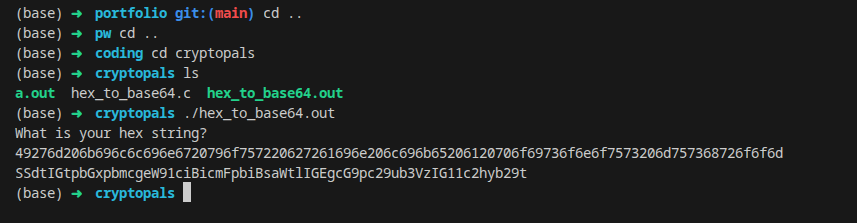
Converting hex to base64 successfully!
Programming Notes:
- Lookup Table Optimization: If we used a lookup table instead of calculating
hex_to_num, our program would run faster. Not super important since we don't need super quick efficiency, but something to point out.- Unsigned vs. Signed Types: Raw binary data should always be stored in
unsigned charrather thansigned char(or standardchar). This avoids unexpected issues with (signed integer overflow)[https://en.wikipedia.org/wiki/Integer_overflow]. I was too lazy to change it for this, but again, worth noting.