Portfolio Dev (Part 2.5): CI/CD and Self Hosting (Broken OS Edition)
originally created on 2024-12-28
tags: [coding, portfolio-dev-series]
- - -
Link to the previous post for context: Part 2
Oh my god, I can't believe I have to come back to this.
*sigh*
What Happened
It was a beautiful day - December 24th. Some may call it Christmas Eve.
I was just playing around with my Docker containers, as I was trying to get a new project attached
to my portfolio website (Git-Aura Evaluator, blog about it soon maybe). This worked swimmingly.
However, upon trying to login to my server using its web UI, I found an issue: the login page no longer
worked.
Curious, I tried to see what was going on. It turns out that the original Nginx process that handles
the server's entire web UI was no longer running. I must have forgotten, but I accidentally stopped
the Nginx service on my server when running my Nginx Docker container for my portfolio. I didn't realize for
so long because I had no need to access the web UI.
Upon realizing this, I stopped my portfolio container and tried to start the Nginx service.
However, I forgot that I had done something else - while fooling around with the original Nginx service,
I deleted a file that was essential to the Nginx service. This file was specific to the Ugreen NAS
that I was running everything on - /etc/nginx/ugreen_security.conf.
Thankfully, I had a backup of this file (because I am a very responsible server manager).
However, upon restoring the file, I ended up running into more issues. Long story short,
I tried to reboot my server to see if that would fix the issue. It did not. In fact, I had some bigger issues.
My home directory was gone.
I don't know what happened, but my home directory was completely wiped. I had no idea what to do.
This was a huge issue, as all of my projects were stored in my home directory.
This also broke the web UI even further. Upon trying to access it, I would get an error
saying that "necessary device information was missing". Even if I was able to reconstruct my home
directory (which I wasn't), I would be apparently missing some device information stored in that directory.
So, what did I do?
The Thought Process
First of all, I panicked. That's also why there aren't that many images in this blog - I didn't really think about documenting this process.
Thankfully, I had a backup of my data within the NAS (my server), so losing
all of my data was not a concern. However, I was still worried about the state of the server.
I tried to find an ISO image for my NAS, but it was not publicly available. With this in mind, I decided
to speedrun installing TrueNAS Scale.
I found TrueNAS Scale to be pretty nice. It was user friendly (not as friendly as Ugreen's OS, but still),
and it had a lot of features that I liked. I installed
Portainer on it and got my Docker containers up and running.
However, the next issue came to mind: CI/CD.
CI/CD Refactoring
Since I was running the containers on Portainer (as opposed to the command line), I had to refactor my CI/CD.
I didn't want to just SSH into my machine and then run the Docker commands with my script.
I decided to use DockerHub for my CI/CD.
At first, I didn't want to use it because I didn't want my images to be publicly available.
However, I found out that I could make a single private repository for free. By putting my images
under different tags, I could have up to 100 images in there.
I remade my deployment script so that it would build the image and push it to DockerHub.
This script was much shorter than my previous one! That was pretty cool.
I also had to change my docker-compose file. In order to automatically pull the image from DockerHub,
I added a container to my project: Watchtower.
In the Watchtower container,
I configured it so that it would check all the containers in the project every 30 seconds. If it found that a container was out of date, it would pull the latest image from DockerHub and restart the container. This was pretty nice!
Almost Done...Or Are We?
I just had one thing left to do after setting all of this: the freaking SSL certificate.
My website worked fine on the new operating system, but it was not secure.
I wanted to use Certbot as I did before, but I ran into an issue.
It turns out, TrueNAS Scale has a default SSL certificate that is self-signed.
This is great for the web UI, but not for my website.
Whenever I tried to run Certbot, it would fail because trying to access anything on the NAS
with HTTPS would fail due to the self-signed certificate.
I tried to find a way to disable the self-signed certificate, but I couldn't.
I tried to find a way to use Certbot with the self-signed certificate, but I couldn't.
I was stuck, until...
Reinstalling the OG OS
I found out that by sending a request to the NAS creators, I could get the ISO image for the OS.
The reason why it wasn't publicly available was because each ISO was unique to the NAS's serial number.
Soooooo, I sent a request and got the ISO. I reinstalled the OS and everything...was back.
This time, I did not want to use the terminal. I was kind of scared that I would mess up again.
Besides, the Ugreen OS has a Docker app that I can just use without the terminal.
I set up my containers, and everything...was back to normal!
Moral of the Story
Be more careful, and don't...delete essential files, especially if you don't know what they do.
I still have to remake my Git-Aura Evaluator project, but that's a story for another day.
Until then, I hope you enjoyed this short blog. It wasn't really as detailed or polished as my other ones, but I hope you enjoyed it nonetheless.
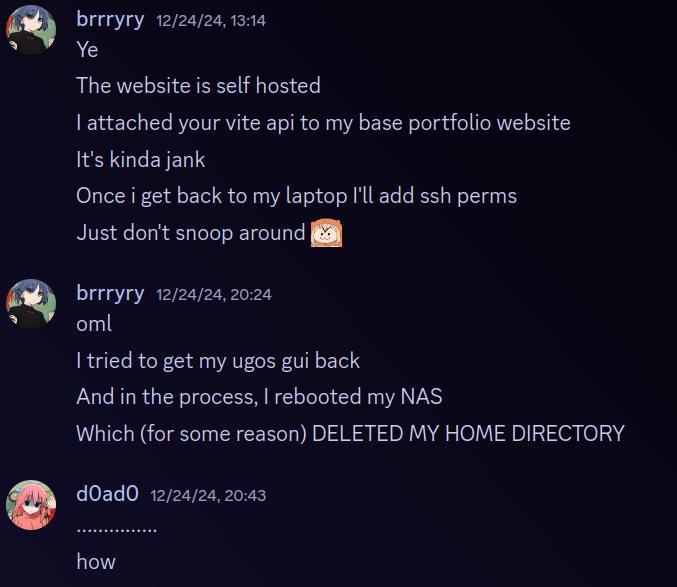
Me on Discord after breaking my server
comments
no comments yet. be the first to comment!
please log in to post a comment.